Take Real Breaks,Stay Productive,Feel Better
A native desktop app that reminds you to take breaks, stretch, and stay healthy. For macOS, Windows, and Linux.
One-time payment · Also available as a free Chrome extension





Featured On
%
of Remote Workers Suffer from Health Issues
Long sitting sessions, back-to-back meetings, and marathon work sessions take a toll on your body and mind.
h+
avg daily sitting
Prolonged sitting causes pain
Hours without movement leads to chronic back pain, stiff neck, and poor posture that compounds over time.
%
report eye strain
Screen time strains your eyes
Continuous screen exposure causes dry eyes, headaches, and blurred vision — especially without regular breaks.
×
higher burnout risk
Fatigue kills productivity
Mental exhaustion from non-stop work reduces focus, creativity, and output quality.
Transform Your Work Routine with DeskBreak
Before DeskBreak
- Constant fatigue and stiffness from prolonged sitting
- Frequent headaches and eye strain
- Decreased productivity due to discomfort
- Feeling guilty about taking breaks

After DeskBreak
- Energized and flexible throughout the day
- Reduced eye strain with regular screen breaks
- Improved focus and productivity
- Guilt-free, structured breaks for better work-life balance
Stop sitting through the pain
Join thousands of remote workers who take better breaks
What People Say About DeskBreak
Join remote workers who've transformed their workday health.
Dan Mindru
@d4m1n
I love this product! From my own experience small changes indeed compound to habits that change your life. It's exactly how I got to ship my own apps 💪
Max Blade
@_MaxBlade
I love the idea of being reminded to take a break—for some, this is more important than being reminded to work 😅
Shivansh M.
@shivanshco
Tried it and loved it! The gamification is pretty interesting as well.
Shala
@indieshatau
Being reminded to take a break is actually what I need! Otherwise, I end up spending 4-5 hours at my desk without moving. Great product!
Lera Kuntsevich
@thiswillblossom
Exactly what I (and a lot of people i guess) need!
Zeng
@zeng_wt
I love the Personalized Break Reminders feature—balancing productivity and health is so important. Wish you all the success with DeskBreak.
Dan Mindru
@d4m1n
I love this product! From my own experience small changes indeed compound to habits that change your life. It's exactly how I got to ship my own apps 💪
Max Blade
@_MaxBlade
I love the idea of being reminded to take a break—for some, this is more important than being reminded to work 😅
Shivansh M.
@shivanshco
Tried it and loved it! The gamification is pretty interesting as well.
Shala
@indieshatau
Being reminded to take a break is actually what I need! Otherwise, I end up spending 4-5 hours at my desk without moving. Great product!
Lera Kuntsevich
@thiswillblossom
Exactly what I (and a lot of people i guess) need!
Zeng
@zeng_wt
I love the Personalized Break Reminders feature—balancing productivity and health is so important. Wish you all the success with DeskBreak.
Dan Mindru
@d4m1n
I love this product! From my own experience small changes indeed compound to habits that change your life. It's exactly how I got to ship my own apps 💪
Max Blade
@_MaxBlade
I love the idea of being reminded to take a break—for some, this is more important than being reminded to work 😅
Shivansh M.
@shivanshco
Tried it and loved it! The gamification is pretty interesting as well.
Shala
@indieshatau
Being reminded to take a break is actually what I need! Otherwise, I end up spending 4-5 hours at my desk without moving. Great product!
Lera Kuntsevich
@thiswillblossom
Exactly what I (and a lot of people i guess) need!
Zeng
@zeng_wt
I love the Personalized Break Reminders feature—balancing productivity and health is so important. Wish you all the success with DeskBreak.
Dan Mindru
@d4m1n
I love this product! From my own experience small changes indeed compound to habits that change your life. It's exactly how I got to ship my own apps 💪
Max Blade
@_MaxBlade
I love the idea of being reminded to take a break—for some, this is more important than being reminded to work 😅
Shivansh M.
@shivanshco
Tried it and loved it! The gamification is pretty interesting as well.
Shala
@indieshatau
Being reminded to take a break is actually what I need! Otherwise, I end up spending 4-5 hours at my desk without moving. Great product!
Lera Kuntsevich
@thiswillblossom
Exactly what I (and a lot of people i guess) need!
Zeng
@zeng_wt
I love the Personalized Break Reminders feature—balancing productivity and health is so important. Wish you all the success with DeskBreak.
What are the Benefits?
Enhanced Focus
Enhanced focus and mental clarity
Boosted Creativity
Boosted creativity from regular mental breaks
Better Health
Improved overall physical health
Work-Life Balance
Increased job satisfaction and work-life balance
Elevate your workday: Thrive with DeskBreak!
How It Works
- 1Download the App
- 2Set Up Your Breaks
- 3Enjoy Healthier Workdays!
Experience the difference!
Experience a Healthier Workday
Elevate Your Workday with DeskBreak
Powerful features designed to keep you healthy, focused, and productive throughout your day.
Break Reminders
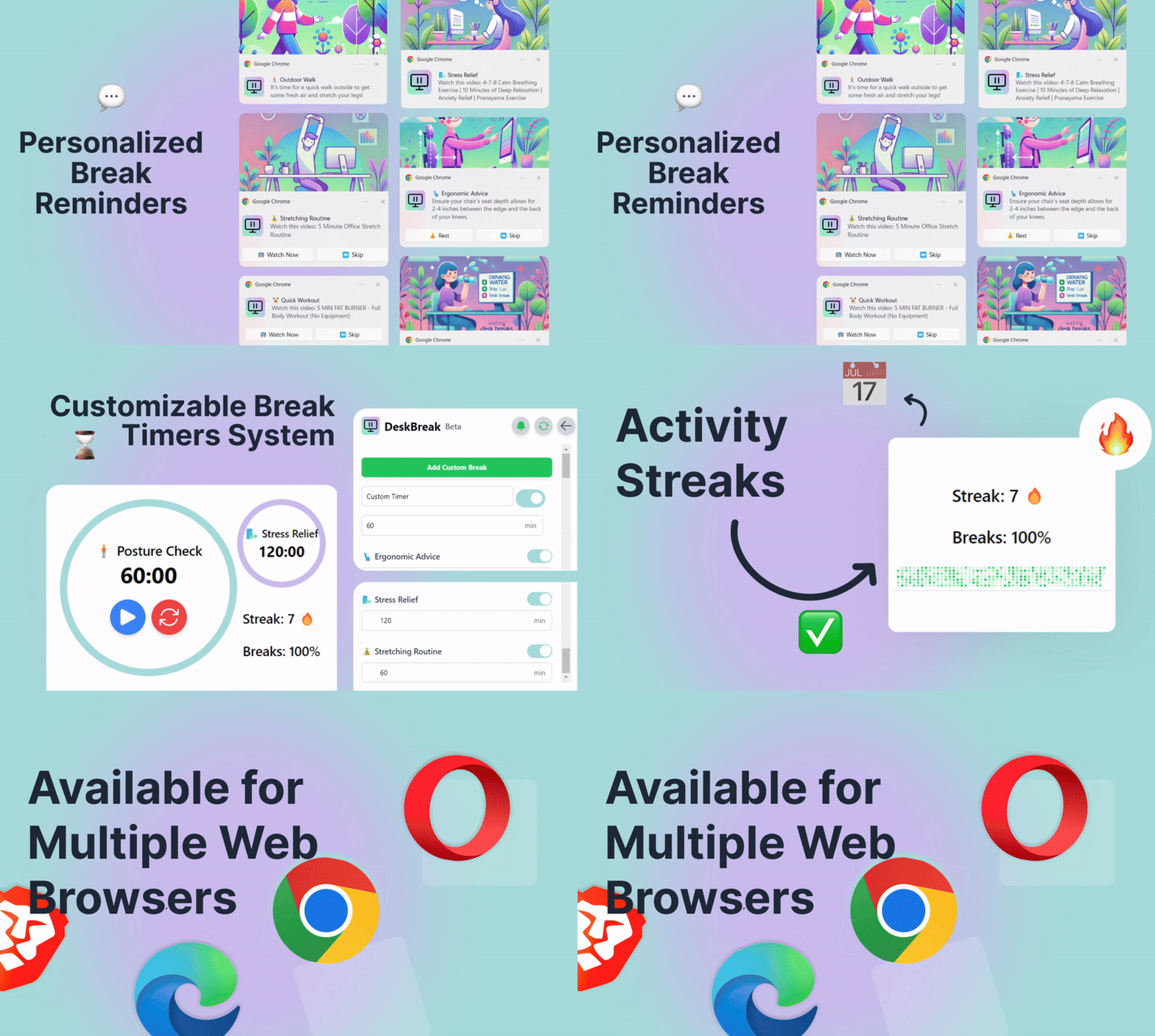
Choose from stretching, hydration, and quick exercises. Customize reminders to fit your work schedule and stay healthy.
Activity Tracking
Monitor your progress with activity streaks and visualize health improvements with detailed graphs.
Custom Schedules
Set preferred break times aligned with your daily routine. Optimize your work experience for your specific needs.
Smart Timer & Alerts
Effortlessly manage break timers with built-in alerts. Receive timely notifications and maintain a balanced workday.
Desk workers are already working healthier!
Don't take our word for it. Here's what they have to say about DeskBreak.
I love the idea of being reminded to take a break—for some, this is more important than being reminded to work 😅

Nice! Now I don't have to feel guilty taking a break, I'm forced into it! 😂

Take care of yourself and avoid burnout with Miguel!

Exactly what I (and a lot of people i guess) need!

Tried it and loved it! The gamification is pretty interesting as well.

Being reminded to take a break is actually what I need! Otherwise, I end up spending 4-5 hours at my desk without moving. Great product, Miguel!

I love the Personalized Break Reminders feature—balancing productivity and health is so important. Wish you all the success with DeskBreak.

Love the idea of gamifying the taking breaks routine. That will surely incentivize people to take regular breaks and make the process more engaging and fun!

DeskBreak is a product that really resonates with me, and I'm sure many other desk workers will feel the same way. Regular breaks are essential for staying healthy, focused, and productive.

DeskBreak sounds like a great tool for improving health and productivity during long work days. The combination of personalized break reminders, activity tracking, and ergonomic tips make it super useful for desk workers.


Hey, I'm Miguel! 👋
I used to push myself to the limit working long hours without breaks, and it led to burnout. That's when I realized I needed a tool to remind me to take care of myself—so I built DeskBreak.
What started as something just for me has turned into a way to help others stay healthy at their desks too. With DeskBreak, you'll remember to stretch, hydrate, and take those much-needed breaks—keeping both your body and productivity in check.
Available on Your Desktop
A native app built for performance and reliability on every major platform.
Plus a free Chrome extension for browser-based reminders.
Pricing
Achieve Work-Life Balance with DeskBreak
Chrome Extension
Browser-based break reminders
Free
- Basic Break Reminders
- Works in Chrome, Edge, Brave
- Simple Break Timer
Desktop App
Native app for macOS, Windows & Linux
$78
$39
USD / Lifetime
Or $19/year with the 1 Year Access plan
- Lifetime Access
- One-Time Payment
- Unlimited Break Reminders
- Multiple Break Activities
- Customize Time Intervals
Pay once. Access forever.
Ready for Healthier
Workdays?
Download DeskBreak and start taking real breaks. Your body and mind will thank you.